Usage
The use of datacube-explorer is divided into two distinct parts. The first one refers to the cubedash-gen command-line tool that configures the database by defining the extensions of the cataloged ODC-Datasets.
Generating the data extents
The first step refers to the creation of the extents of the data cataloged in the ODC. In this process, the cubedash-gen tool is used, which, as mentioned, is responsible for configuring the database, calculating the extents, and going up the database
To start, we will generate the datacube-explorer schema inside PostgreSQL, and we will already calculate the extents. Through the use of cubedash-gen, these options can be expressed by the command below:
cubedash-gen --init --all --custom-crs-definition-file custom_crs.json
Note
For the BDC, it is necessary to use the --custom-crs-definition-file option, which allows custom CRSs based on the custom_crs.json file. This gives the user the freedom to choose which projection to work on and avoids data reprojections within the datacube-explorer.
Note
If you have installed the tool using Docker, it is necessary to use the docker-compose exec explorer bash command to access the container termination and then perform the execution of the command presented previously
After the execution is finished, an output similar to the one presented below should be presented. In this output, all the cataloged products will be presented:
Initialising schema
Updating 6 products for LocalConfig<loaded_from=['/home/bdc/.datacube.conf'], environment='datacube', config={'db_database': 'opendatacube', 'db_hostname': '127.0.0.1', 'db_username': 'opendatacube', 'db_password': '***', 'db_port': '5432', 'index_driver': 'default', 'db_connection_timeout': '60'}>
Generating product summaries...

CB4_64_16D_STK_1 done: (15 datasets)
CB4_64_16D_STK_1_ingested done: (428 datasets)
done. 2/2 generated, 0 failures
Running the application
With all previous steps completed, it is now possible to run the datacube-explorer application and then start the searches and views data that are cataloged.
For those running directly in a conda environment, it is possible to run the data-explorer through the gunicorn tool:
gunicorn -b '127.0.0.1:5000' -w 4 cubedash:app
On the other hand, if you are in the Docker, restart the container and ready, the access can already be:
docker-compose restart
Now the application can be accessed through the address 127.0.0.1:5000/bdc/odc/.
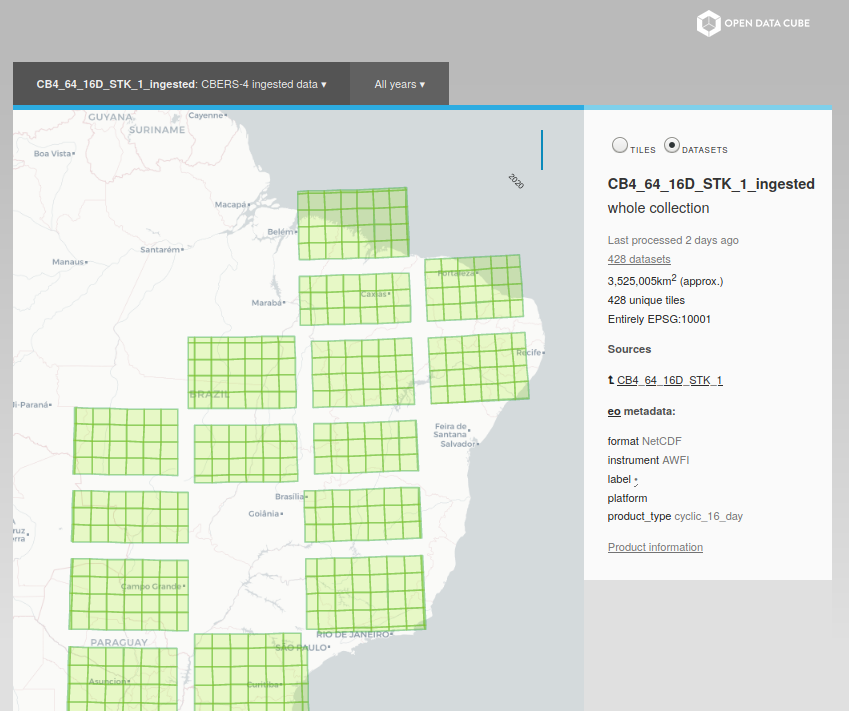
The result presented on the screen will be similar to the one presented below and may vary according to the products registered in your ODC instance